Email management for construction and project-based businesses

Email management, without the filing.

Every email in and out of every connected mailbox, read once and filed to the project and the company it belongs to — automatically. No Outlook add-in. No prompt on every send. Nothing for your team to file.

Read-only Microsoft 365 connection · Shared mailboxes unlimited · Your history brought in at setup

Why filing fails

Email management works — as long as every person files every email, every time.

Email management software has been around for twenty years. It embeds in Outlook and asks the sender to pick a project folder on every send. Some people do. Some people click past it. Most do both, depending on the day.

The record you end up with is only as complete as your least diligent colleague on their busiest afternoon — and the email you need is always the one that got clicked past.

Dayfile takes the person out of it. It reads the mailboxes you connect and files every email itself, to the project and to the company it belongs to. There is no prompt, because there is nothing to prompt for.

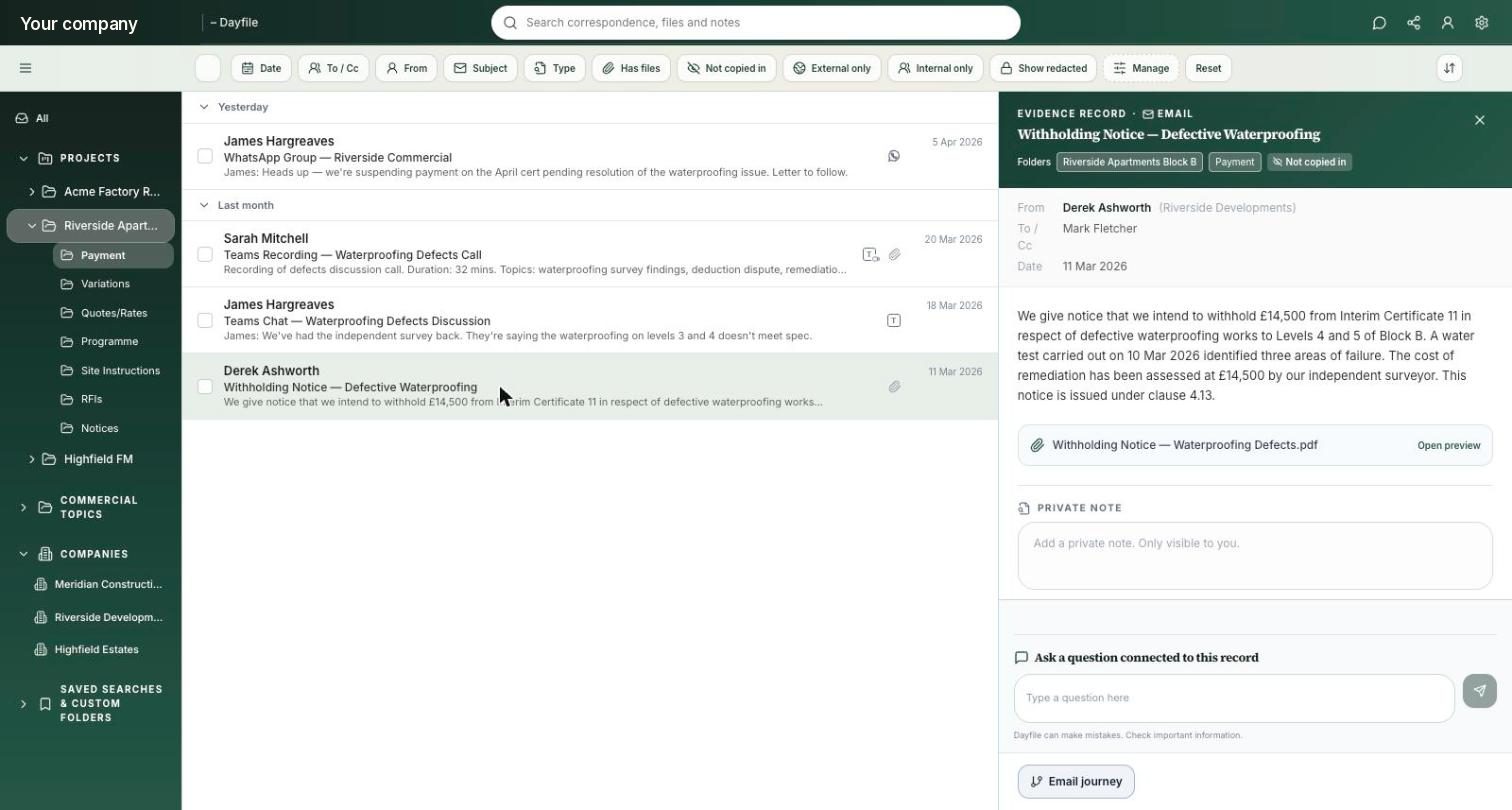
An email record in Dayfile: a withholding notice filed to the project’s Payment folder, tagged ‘Not copied in’, with sender, recipients, date, the attachment and a question box connected to the record
A withholding notice, filed on its own to the project and its Payment folder — and tagged ‘Not copied in’, because the person looking wasn’t on it. Demonstration data.

Side by side

How Dayfile compares with traditional email management.

Traditional email management
Dayfile
Getting set up
An Outlook add-in to deploy, and folder structures to build and maintain.
One read-only connection to Microsoft 365. Done in a morning. Nothing on anyone’s machine.
Filing an email
A prompt on every send. People pick a folder — or click past it.
Filed on its own, to the project and the company it belongs to. Nobody does anything.
Email you weren’t copied on
Only if the person who received it filed it.
Filed against the job, not against who was on it.
Attachments
Filed with the email, if the email was filed.
Indexed and filed — quotes, programmes, notices, daywork sheets.
Teams chats and meeting transcripts
Varies — some tools archive Teams channels; most don’t cover chats or transcripts.
Chats and recorded-meeting transcripts, filed to the project with the email.
WhatsApp groups
Not covered.
The project-relevant chat, photos and videos from the groups you include, filed to the job.
History before you started
Historic import is usually a separate, scoped exercise.
Brought in from the mailboxes at setup, included — usually more than a year per mailbox.
What you get back
A filed, searchable archive.
Folders kept up to date, a summary on every folder, answers with the evidence, and reports that arrive on their own.

Where it goes

Folders named the way your contracts are.

Every project gets a set of commercial folders. Every company you deal with gets one too. An email can live in more than one, with its source intact.

By project

Payment, Variations, Programme, Site Instructions, RFIs, Notices — or Compensation Events, Early Warnings and Technical Queries if you’re an NEC business. Your contract’s words, not ours.

Station Road (NEC)Updated 6 min ago
Payment & applications96
Compensation events71
Early warnings18
Technical queries12
Programme & delay44

By company

Client, consultant, subcontractor, supplier — everything you’ve ever exchanged with them, across every job, with a summary of the last 7 and 30 days on top.

Thornley M&E2 projects
Quote — Level 3 socketsEmail
Daywork sheet DS-014Attachment
Programme meeting — 5 SepTeams
Last 7 daysQuote for the Level 3 sockets received Tuesday, £4,800. Daywork sheet submitted Thursday. No instruction from the client found for either.

And what stays out

Newsletters, system notifications, personal and HR conversations are left out. Commercially sensitive correspondence is restricted to the people who should see it. Anything Dayfile can’t place confidently goes into a visible Unfiled folder — never guessed.

This morning214 items
Filed to a project or company167
Left out — not project work39
Restricted — directors only2
Unfiled — for you to check6

In the product

A folder for every company, with the summary written for you.

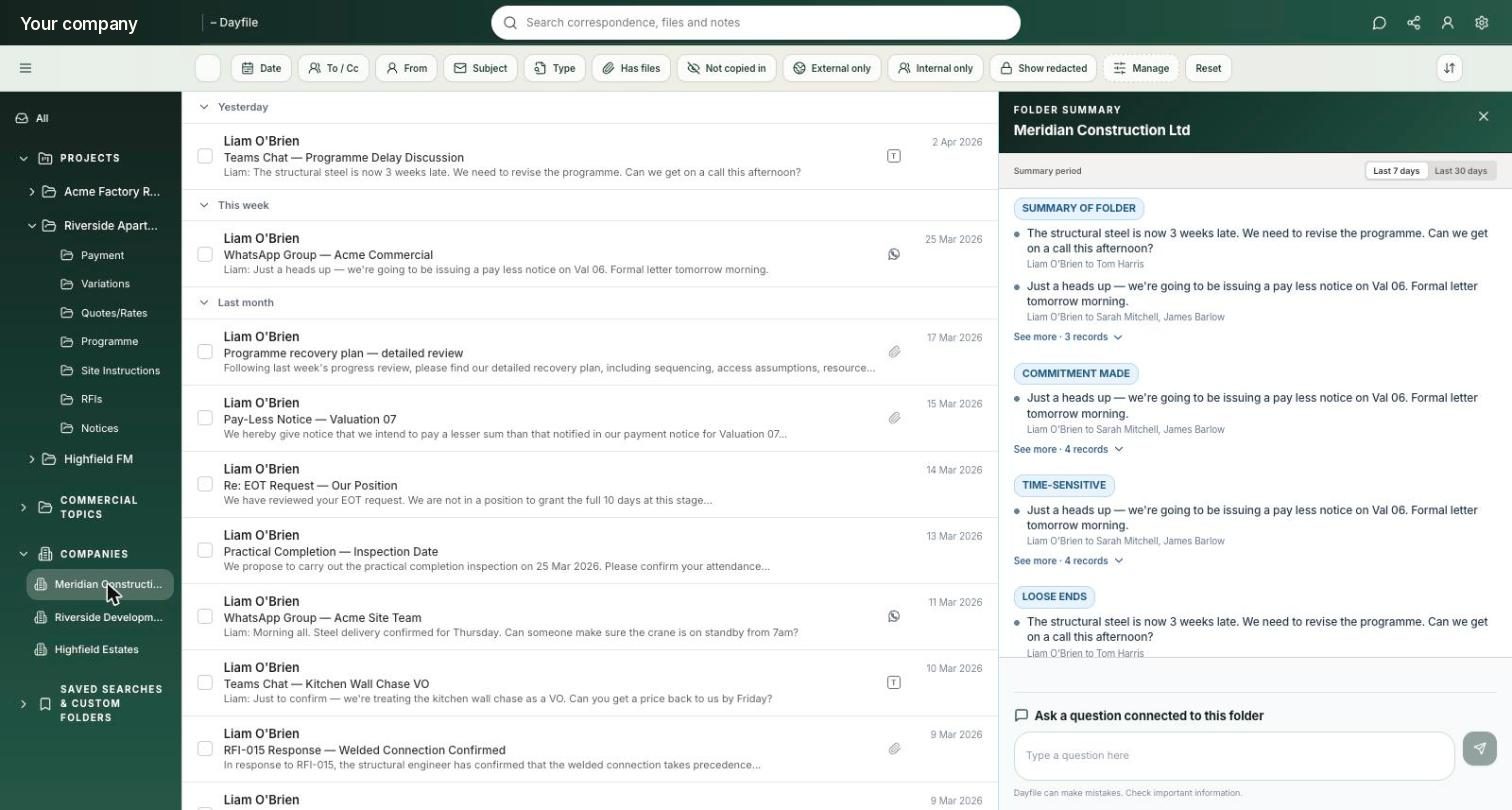
A company folder in Dayfile with its 7-day summary: summary of folder, commitment made, time-sensitive, loose ends
A subcontractor’s company folder: everything exchanged with them, and the last 7 days summarised — commitments, time-sensitive items, loose ends.
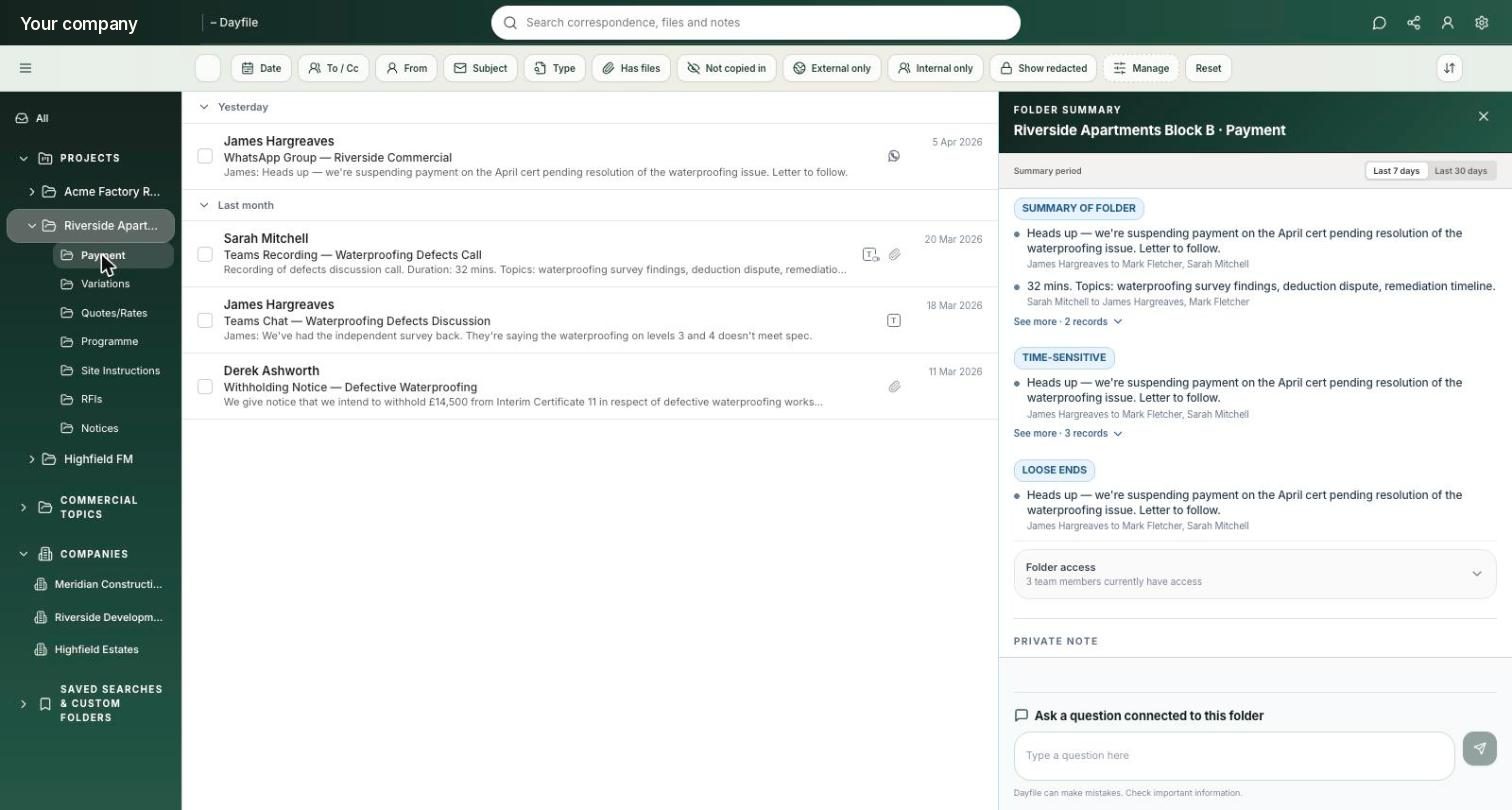
A project’s Payment folder in Dayfile with folder access controls and the folder summary
A project’s Payment folder, with folder access — three team members can see this one — and a private note only you can read.

Already using Mail Manager, Newforma or CloudFiler?

You don’t have to switch anything off to try Dayfile.

Dayfile reads from Microsoft 365, not from your filing folders, so it can run alongside whatever you use today. Connect the mailboxes, let it bring in the history, and compare the two records side by side. If you decide to move, there is nothing to migrate from your filing folders — the record is built from the mailboxes, and older archives can be loaded separately if you need them.

Talk to us about switching

Your information stays yours.

Dayfile can’t send, edit or delete anything in Microsoft 365, and you can disconnect it at any time. Personal, HR and irrelevant conversations stay out, while sensitive information is only visible to the people who should see it. Your data is securely stored in the UK and is never used to train AI models.

Cyber Essentials
certified
UK GDPR
compliant
UK hosted
USA, Australia & Canada available
Microsoft
verified partner

See it on your own mailboxes

Filed in a morning. Nothing changes for your team.

Half an hour. We’ll show you what gets filed, what gets left out, and how far back it reaches.

Book a 30-minute demo

Or start a 30-day free trial — unlimited users, nothing to install, disconnect any time.