
WhatsApp groups for construction projects
The site group runs the job. Now it’s in the record.
The project-relevant chat, photos and videos from your WhatsApp groups make their way into the Dayfile — filed to the job, next to the email and the meeting transcript. The “go ahead” message, the photo of the finished work, the video of the leak.
Only the project groups you include · Never anyone’s personal chats · Photos and videos filed too
Why it matters
Half the instructions on a live job are given in a WhatsApp group. None of them are filed.
“No problem, we’ll pick those up — I’ll get the lads on it Monday.” That is an instruction, a commitment and the start of a variation, and it lives on a site manager’s phone. When the argument comes, the phone has been replaced, the person has left, or the group has 4,000 messages and nobody can find it.
Dayfile brings the project-relevant chat, photos and videos out of the group and into the job’s record — filed by project, by company where it can tell, and in date order with everything else. Ask about it, see it in the folder summary, or find it in a timeline.
Only what you include. You choose which project groups are in. Nothing is taken from anyone’s personal chats or phone.
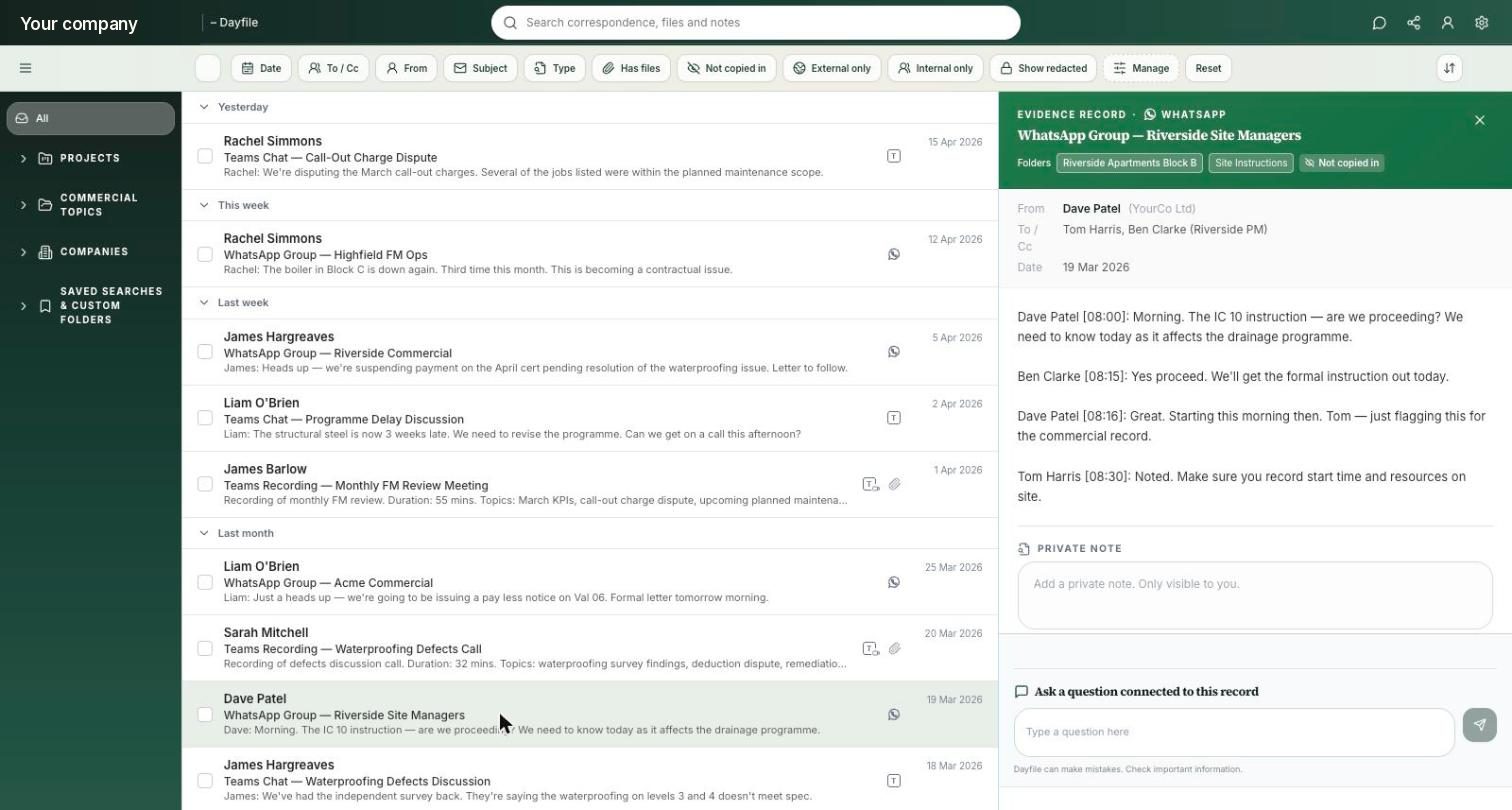
What ends up in the Dayfile
The chat, the photos, the videos — filed.
The messages that matter
Instructions, confirmations, “go aheads”, pushback. Filed to the project and, where it can tell, to the company of the person who said it.
Site photos
Progress shots, completed work, defects, deliveries — filed to the job with the date and who sent them, and findable when the question comes.
Videos
The walk-through of the leak, the state of the slab before the pour. Filed to the job with the date and who sent it — evidence you can actually find later.
In date order with everything else
The WhatsApp “go ahead” on Thursday, the email quote on Monday, the client’s pushback in June — one timeline, three sources.
In the summary and the report
A commitment made in a group with no instruction or price behind it shows up in the folder summary and in Monday’s report, not just in the archive.
Only the groups you include
You decide which project groups are in. Nothing is taken from anyone’s personal chats or phone, and the same work-only filters apply.
Your information stays yours.
Dayfile can’t send, edit or delete anything in Microsoft 365, and you can disconnect it at any time. Personal, HR and irrelevant conversations stay out, while sensitive information is only visible to the people who should see it. Your data is securely stored in the UK and is never used to train AI models.
 Cyber Essentials
certified
 UK GDPR
compliant
 UK hosted
USA, Australia & Canada available
 Microsoft
verified partner
See it on your own site group
Pick one project group. We’ll show you what Dayfile files from it.
Half an hour. Bring the group that runs your busiest job.
Book a 30-minute demoOr start a 30-day free trial — unlimited users, nothing to install, disconnect any time.