Email, Teams and WhatsApp — organised for you

All your project correspondence. Organised in one place.

Dayfile automatically sorts your email, Teams messages and WhatsApp conversations by project and company. Nothing to install. Nothing for your team to file.

Free for 30 days, unlimited users · Read-only Microsoft 365 connection · UK hosted (USA, Australia and Canada available) · Cyber Essentials certified · How we handle your data

Your Dayfile

Every project. Every company. Automatically organised.

One place for everything your business says, sends and agrees. Dayfile organises it into the right folders, keeps every summary up to date, and lets you see exactly where the information came from.

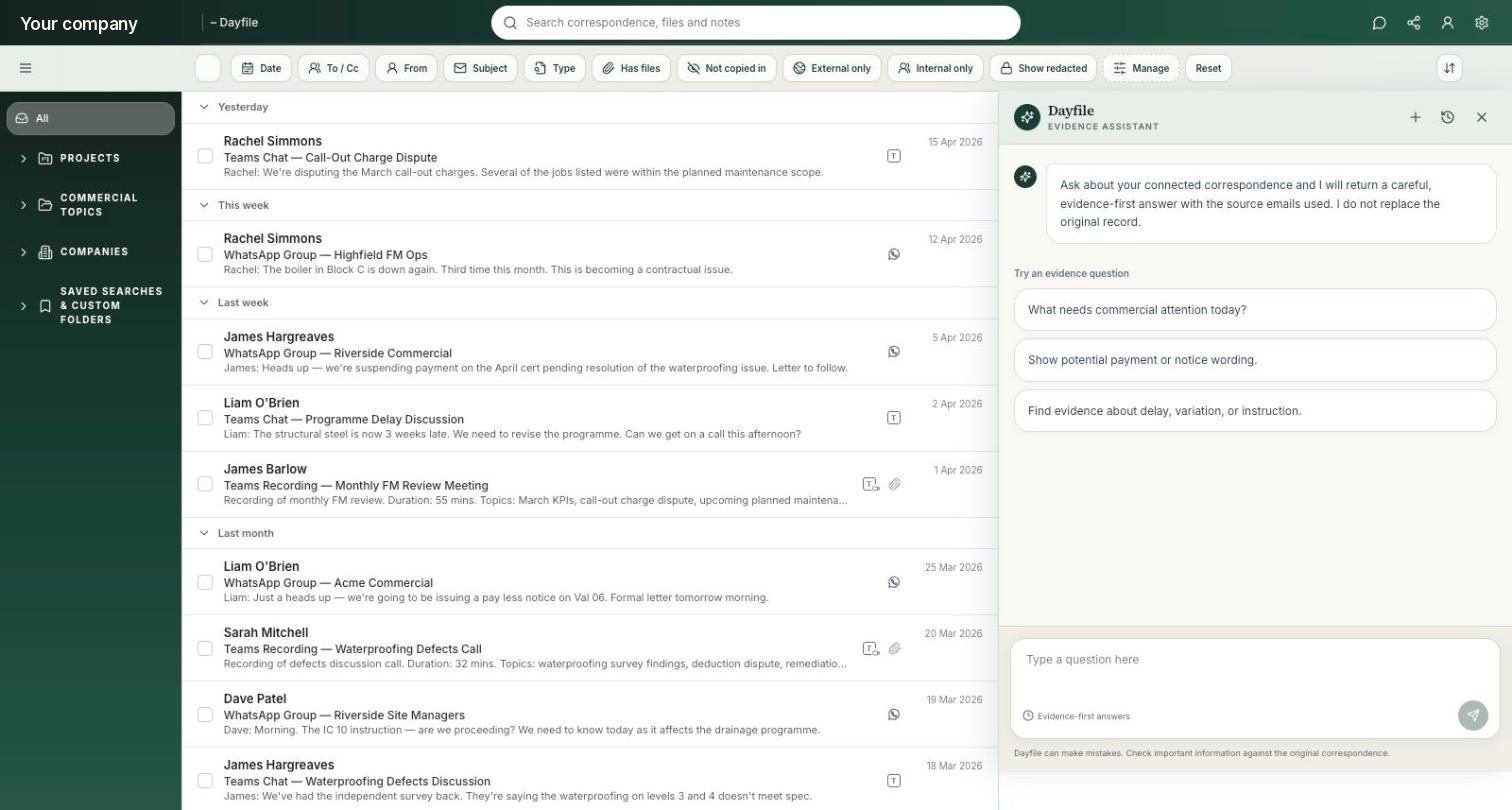
Dayfile: a project’s folders in the sidebar, the filed correspondence in the middle, and the folder summary on the right — summary, commitments made, time-sensitive items and loose ends, with a question box connected to the folder
A project in Dayfile — every email, Teams message and WhatsApp conversation organised into the right folders, with an up-to-date summary of what’s happening. Demonstration data.

How Dayfile knows what matters

Project correspondence stays with the project. Everything else stays out.

Anyone can dump a mailbox into a folder. What makes a Dayfile trustworthy is what never gets in — and who can see what does.

  • Keeps the irrelevant stuff out. Personal emails, newsletters, system notifications and anything unrelated to your projects stay out of Dayfile.
  • Protects sensitive conversations. Private and commercially sensitive correspondence is recognised and restricted, so it isn’t automatically shared with the wider team.
  • You control who sees what. Decide who can access payments, disputes or an entire project, with permissions set folder by folder.
How we handle your data
This morning · 214 items processedOrganised · Left out · Restricted
Organised into Millbrook · Payment

Pay Less Notice — Valuation 07. Also in the client’s company folder.

Organised
Organised into Kittiwake Scaffolding

WhatsApp: off-hire confirmed. Linked to Millbrook · Programme.

Organised
Left out · not project work

Payroll portal notification, supplier newsletter, colleague’s dentist appointment.

Left out
Restricted · director to director

Board discussion about a subcontractor’s pricing. Visible to directors only.

Restricted
Nothing to installNothing for your team to file
“This saves me hours every week — trawling through emails, chasing people for updates. Now it gets served to me on a plate, and jobs aren’t sat waiting on an answer.”
Commercial Director · Main contractor · Dayfile customer

Based on your own information

Finding it is the start. Using it is the point.

Dayfile doesn’t just organise your information. It helps you understand it, ask questions and stay on top of what matters.

01

Folder summaries

“Programme, Millbrook — last 7 days: two-week slip to Level 2 handover, revised Rev C issued Thursday, no EOT request found.”

See what’s happened without reading every message. Every folder has a plain-English summary of the last 7 and 30 days, updated automatically as new information comes in.

02

Ask Dayfile

“Did we ever price the extra drainage on Block B?”

Ask a question. Get an answer from your own information. Ask about a folder, project, company or across the whole business. Every answer links back to the original source, so you can see exactly where it came from.

03

Reports

Monday 06:00 · Commercial risk, open items, gone quiet, loose ends.

The right information, delivered automatically. Choose a weekly or monthly report built around a role, project or area of the business, and send it automatically to as many people as you choose.

04

Timelines

“Show me everything on the Level 13 variation.”

See exactly what happened, in the order it happened. Dayfile brings together emails, Teams messages, meetings and WhatsApp conversations into a clear timeline — even going back years or involving people who have since left the business.

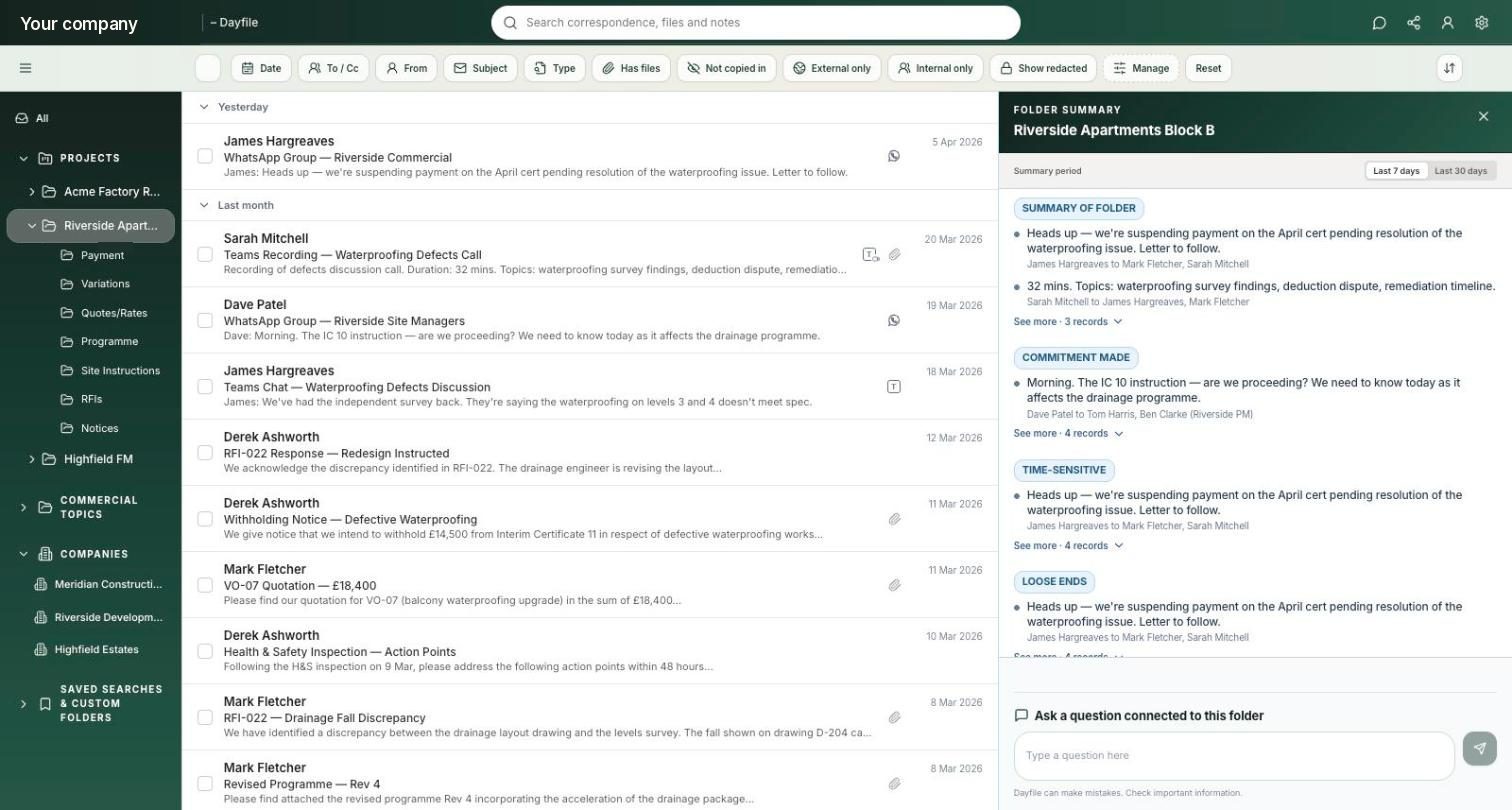
Ask Dayfile: the evidence assistant open beside the filed correspondence, offering evidence-first answers with the source emails used
“Ask Dayfile” sits alongside your correspondence — ask questions in plain English and get answers linked directly to the original source. Demonstration data.

Getting started

Connected in a morning. Nothing changes for your team.

Start with a 30-day free trial — unlimited users, no card, and you can disconnect from your Microsoft 365 admin centre at any time.

Connect Microsoft 365

Connect securely through your Microsoft 365 admin centre. Choose which mailboxes to include, with read-only access that can be revoked at any time. Shared mailboxes are unlimited and free.

Dayfile brings in your history

Dayfile doesn’t start from today. When you connect a mailbox, it brings in the correspondence that’s already there — typically going back months or even years.

Add Teams and WhatsApp

Teams is included through the same Microsoft 365 connection. Add the project WhatsApp groups you want included, and relevant conversations, photos and videos are organised alongside the rest of your project correspondence.

Who it’s for

Built for the businesses that run on projects.

Different businesses. Same challenge: keeping track of what’s happening across every project.

A note from the founder

Back in the day before email, every office kept a day file.

One folder. A copy of everything that went out, filed on the day it went out. Any argument about who said what, you pulled the file and read it back. People used to say, “It’s in the day file.” That was enough.

Then email came, and for thirty years nobody kept one. There is more correspondence than ever — email, Teams, WhatsApp — and no file.

Dayfile gives every project its day file again — automatically. So when someone asks “did we ever agree to that?”, you say: “It’s in the Dayfile.”

Gari Nickson MRICSFounder, Dayfile · Read the full letter →

Your information stays yours.

Dayfile can’t send, edit or delete anything in Microsoft 365, and you can disconnect it at any time. Personal, HR and irrelevant conversations stay out, while sensitive information is only visible to the people who should see it. Your data is securely stored in the UK and is never used to train AI models.

Cyber Essentials
certified
UK GDPR
compliant
UK hosted
USA, Australia & Canada available
Microsoft
verified partner

See it on your own projects

See what Dayfile finds for your business.

Give us 30 minutes and we’ll show you Dayfile working on real project correspondence — so you can see exactly what it organises, what it finds and how you could use it.

Book a 30-minute demo

Or start a 30-day free trial — unlimited users, nothing to install, disconnect any time.